
解锁的Django ORM的核心用法系列(一)
Sprite
发表于 2023年11月18日

注意:所有命令都在Postgres上进行了测试
模型
让我们准备模型。这将在数据库中实际创建我们的表格。
from django.contrib import authfrom django.db import modelsclass Publisher(models.Model):name = models.CharField(max_length=50, help_text="Publisher's name")website = models.URLField(help_text="Publisher's website")email = models.EmailField(help_text="Publisher's email")def __str__(self):return f"Publisher: {self.name}"class Book(models.Model):title = models.CharField(max_length=70)publication_date = models.DateField()isbn = models.CharField(max_length=20)publisher = models.ForeignKey(Publisher, on_delete=models.CASCADE)contributors = models.ManyToManyField("Contributor", through="BookContributor")def __str__(self):return f"{self.title} ({self.isbn})"class Contributor(models.Model):first_name = models.CharField(max_length=70)last_name = models.CharField(max_length=70)email = models.EmailField()def __str__(self):return f"{self.first_name} {self.last_name}"class BookContributor(models.Model):class ContributionRole(models.Model):AUTHOR = "AUTHOR", "Author"CO_AUTHOR = "CO_AUTHOR", "Co-Author"EDITOR = "EDITOR", "Editor"book = models.ForeignKey(Book, on_delete=models.CASCADE)contributor = models.ForeignKey(Contributor, on_delete=models.CASCADE)role = models.CharField(max_length=20)
创建一个对象并稍后保存它
publisher = Publisher(name="Oreilly", website="https://oreilly.com", email="support@oreilly.com")publisher.save()

立即保存数据
save 方法。Contributor.objects.create(first_name="Jozka", last_name="Kukuricudus", email="jozka@gmail.com")
一对多关系
首先,我们需要找到与这本书相关的出版商。请注意,我们不使用出版商的主键,而是使用整个对象。ORM会处理其余的事情。
publisher = Publisher.objects.get(name="Oreilly")Book.objects.create(title="Python From Zero to Hero",publication_date=date(2023, 10, 12),isbn="596894049686",publisher=publisher)

多对多关系变体1
首先,我们需要获取 Contributor 和 Book 对象。然后,我们将这两个对象放入 BookContributor 中。
contributor = Contributor.objects.get(first_name="Jozka")book = Book.objects.get(title="Python From Zero to Hero")book_contributor = BookContributor(book=book, contributor=contributor, role="AUTHOR")book_contributor.save()

多对多关系变体2
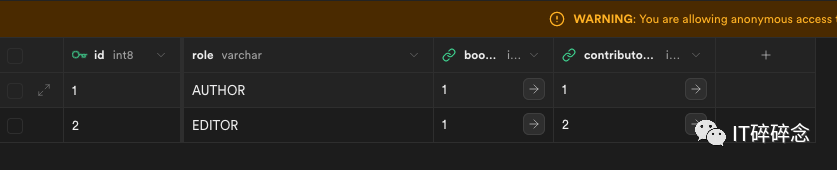
这与之前的类似,但我们将更多责任放在ORM上。这意味着我们可以使用这个,因为有这一行代码 – contributors= models.ManyToManyField(“Contributor”, through=”BookContributor”) 。
book = Book.objects.get(title="Python From Zero to Hero")contributor = Contributor.objects.create(first_name="Anezka", last_name="Nova", email="anezka@nova.com")book.contributors.add(contributor, through_defaults={"role": "EDITOR"})
多对多添加多行
如果我们需要为多对多关系设置多行,我们可以使用 set 方法。在我们的情况下,属性是 contributors 。
publisher = Publisher.objects.create(name="Joe The Publisher", website="https://joey.com", email="joey@gmail.com")contributor1 = Contributor.objects.create(first_name="Giovanni", last_name="Alonso", email="giny@gmail.com")contributor2 = Contributor.objects.create(first_name="Joe", last_name="Doe", email="joedoe@gmail.com")book = Book.objects.create(title="Javascript Mastery", publication_date=date(2022, 5, 6), publisher=publisher)book.contributors.set([contributor1, contributor2], through_defaults={"role": "CO_AUTHOR"})
获取结果时返回异常
publisher = Publisher.objects.get(name="Unknown")
按ID查找
我们不需要通过姓名和其他列进行搜索。我们可以通过ID进行搜索,这样更高效。我们有两种选择来实现它。
publisher = Publisher.objects.get(pk=1)publisher = Publisher.objects.get(id=2)
查找全部
publishers = Publisher.objects.all()查找外键
在搜索外键时,Django会为我们找到数据,我们不需要执行任何连接操作。
book = Book.objects.get(pk=1)print(book.publisher.website) # https://oreilly.com
查找(多行)
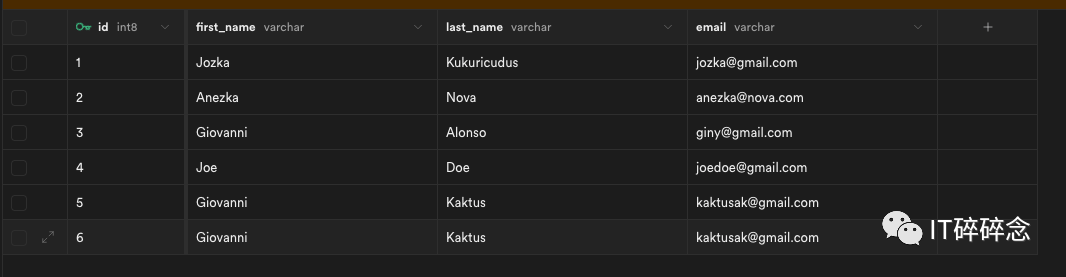
Contributor.objects.create(first_name="Giovanni", last_name="Kaktus", email="kaktusak@gmail.com")contributors = Contributor.objects.filter(first_name="Giovanni")print(contributors)# <QuerySet [<Contributor: Giovanni Alonso>, <Contributor: Giovanni Kaktus>, <Contributor: Giovanni Kaktus>]>
在一篇文章中,我们深入探讨了基本命令、模型和基本对象操作。在接下来的续篇中,我们将更深入地了解Django ORM提供的强大功能。
Previous Post
Python设计模式在实际项目中的应用评论已关闭。